
Have you ever come across one of those digital products on Etsy that looks so simple, but the more you think about it, the more possibilities you start to see?
Well, that's exactly how I feel about printable bingo games!
Now, I know bingo probably isn't the first thing that comes to mind when you're thinking about digital products to create and sell online. But hear me out, my friend, because this little product format has SO much potential.
Think Christmas bingo, birthday party bingo, baby shower games, classroom activities, Easter bingo, road trip games and even bingo games based on specific hobbies or interests.
The possibilities really are endless!
And one of my favourite things about printable bingo games is that once you've figured out how to create one, you can use that same process to build an entire collection of themed products for your Etsy shop.
The only catch?
Creating all those individual bingo cards can become surprisingly time-consuming.
But don't worry, because I'm going to show you a much easier way to do it!
In this tutorial, we'll explore how to research printable bingo games on Etsy, choose a theme, prepare your artwork and create a complete bingo game using my Bingo Builder tool, including the bingo cards, matching calling cards and printable markers.
Ready? Let's get into it!
Why Printable Bingo Games Are a Great Digital Product Idea
One of the things I love about printable bingo games is how incredibly versatile they are.
Bingo is simply the product format. You get to decide who you're creating it for, what occasion it's for and how you want it to look.
For example, you could create:
Seasonal bingo games: Christmas, Halloween, Easter, Valentine's Day and Thanksgiving.
Party bingo games: Baby showers, birthdays, weddings and themed children's parties.
Educational bingo games: Alphabet recognition, numbers, animals, colours and classroom activities.
Family activities: Road trip bingo, holiday games and family game nights.
Niche bingo games: Book clubs, hobbies, special interests and themed events.
And here's where things get really interesting.
You don't necessarily need to come up with a completely different product every time you want to add something new to your shop.
You could start with a dinosaur bingo game, for example, and then create fairy bingo, farm animal bingo, space bingo or construction bingo using the same overall process.
You're simply changing the theme and artwork while keeping the product format familiar.
For creative entrepreneurs who enjoy designing illustrations or working with clipart, this can be a really lovely way to build a cohesive product collection.
Step 1: Research Printable Bingo Games on Etsy
Before I spend time creating a new digital product, I always like to do a little research.
Not because I want to copy what somebody else is doing, but because I want to understand what's already available and what buyers seem interested in.
For printable bingo games, I would start by heading over to Etsy and searching for terms such as:
Printable bingo games
Christmas bingo printable
Kids bingo game
Baby shower bingo
Birthday party bingo
Picture bingo printable
As you browse the search results, start looking for patterns.
What themes keep appearing? Are the products designed for children or adults? How many bingo cards are included? Are sellers offering picture bingo, word bingo or a combination of both?
I'd also pay attention to how sellers are presenting their products.
Are they showing the bingo cards in realistic mockups? Do their listing images clearly explain what's included? Are they offering multiple paper sizes?
These little details can help you understand what customers might expect when purchasing a printable bingo game.
Checking Product Demand With EverBee
I also like to use EverBee to take a closer look at the Etsy market.
It's a research tool that helps me explore existing listings and estimated sales data so I can make more informed decisions about the products I want to create.
For bingo games, I might compare a few different themes, look at the prices sellers are charging and see whether multiple listings appear to be generating consistent sales.
Of course, no research tool can guarantee that your product will sell.
But having some information behind your decision can be much more helpful than simply creating something and hoping for the best!
Helpful resource: Explore EverBee here
Watch the Printable Bingo Games Research Video
If you'd like to see how I approach this research process, I've also created a YouTube video where I explore printable bingo games on Etsy and share what I look for before deciding what to create.
Step 2: Choose Your Bingo Game Theme
For my tutorial, I decided to create something a little different.
Squishy Toy Bingo!
If you have little ones at home, you might already be familiar with those colourful, squishy toys that seem to be everywhere.
My girls absolutely love them, and I thought the cute characters, food shapes and little animals would make such a fun bingo game.
While researching on Etsy, I'd also come across squishy themed bingo printables, so it felt like a lovely example to explore.
The idea was to create a colourful picture bingo game using a collection of squishy style illustrations.
And rather than spending hours drawing an entirely new collection of artwork, I wanted to demonstrate how quickly you could create a finished product using an existing clipart collection.
Which brings us to the next step!
Step 3: Find or Create Your Bingo Artwork
Before we can start building our bingo game, we need some artwork.
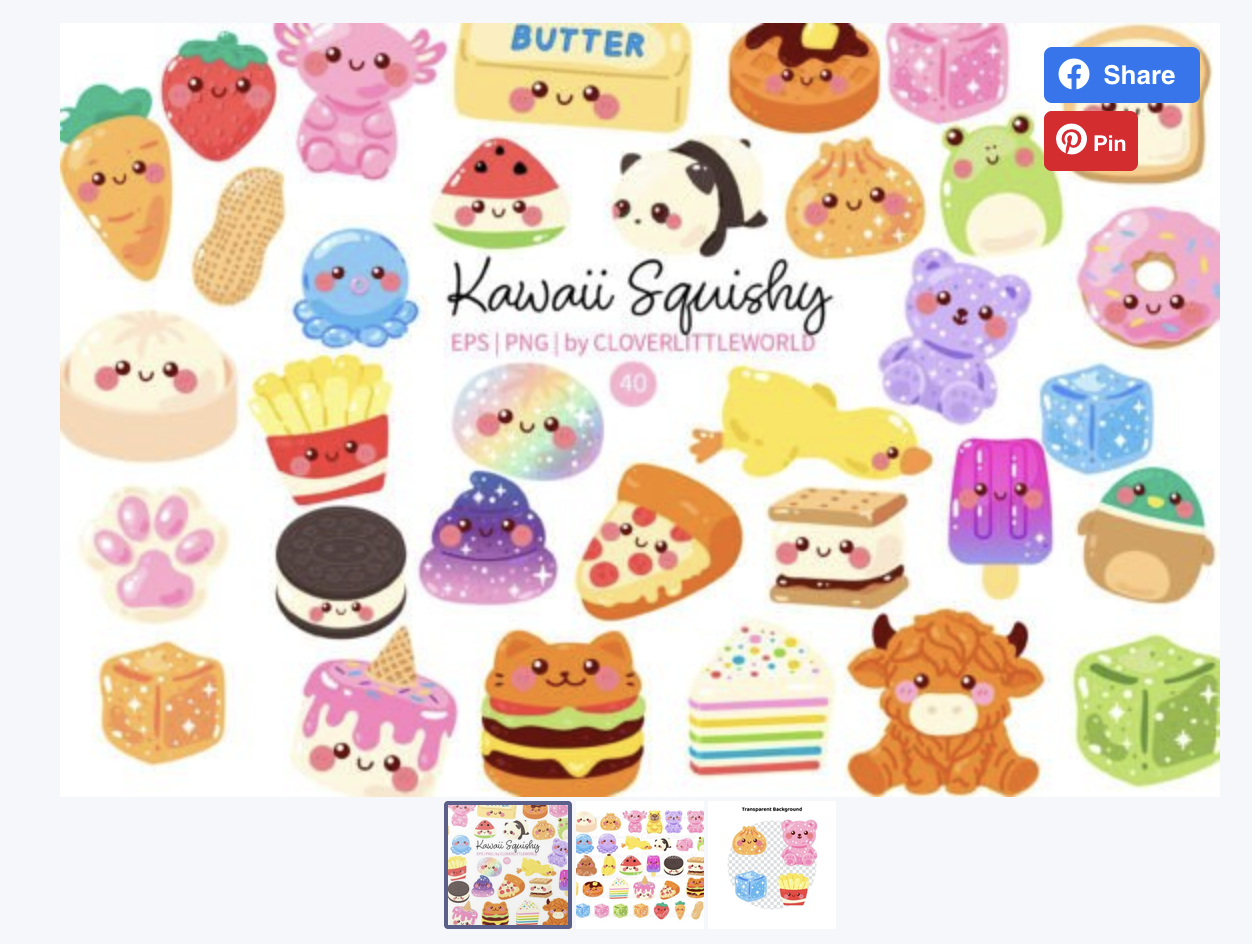
For this example, I found an adorable squishy-style clipart collection on Creative Fabrica.
The pack included colourful illustrations of gummy bears, donuts, animals, food and all sorts of cute little characters.
Resource: View the Squishy Toy Clipart Pack
I selected 24 illustrations from the collection, making sure there was a nice variety of colours, shapes and characters.
You want the artwork to feel like it belongs together, but you also want each illustration to be easy to recognise when someone is playing the game.
Can You Use Clipart to Create Products to Sell?
Yes, provided the licence for the artwork allows your intended commercial use.
Whenever you're using artwork from a marketplace such as Creative Fabrica, it's important to read the licence terms and make sure your finished product complies with them.
And remember, you don't have to use premade clipart!
If you enjoy illustrating, you could create your own characters using Procreate, Affinity Designer, Adobe Illustrator or whichever design software you love.
In fact, creating your own artwork can be a wonderful way to make your products feel more unique.
For this particular tutorial, however, I wanted to focus on showing you how quickly you could turn artwork into a finished printable game.
Step 4: Create Your Printable Bingo Cards Using Bingo Builder
Okay, my friend, this is where the fun really begins!
One of the most time-consuming parts of creating bingo games is making sure every card has a different arrangement of images.
If you're creating 10 cards, that might not sound too bad.
But what if you want to create 30, 50 or even 100 cards?
Manually rearranging all those little illustrations in Canva can become quite the task!
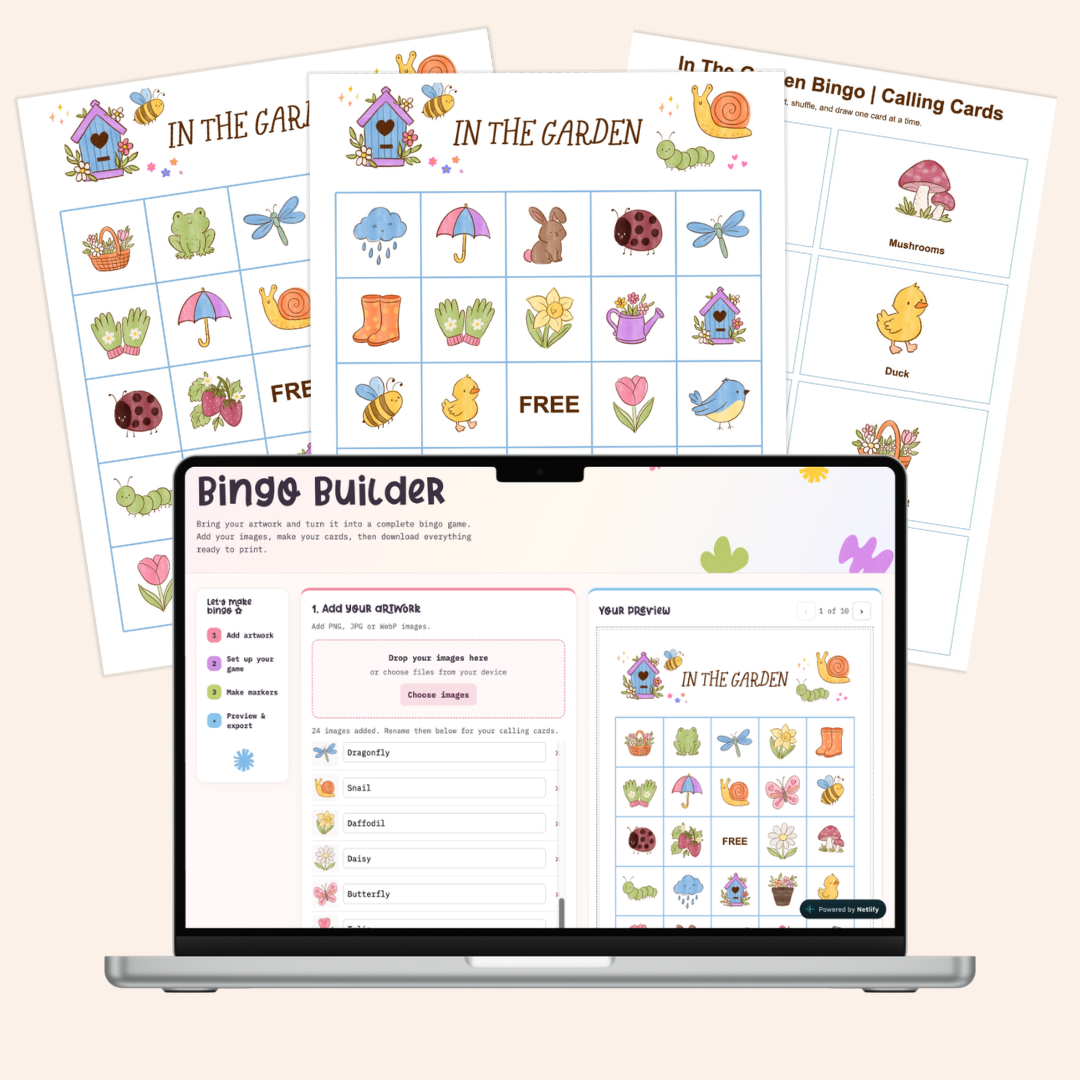
And that's actually why I created my Bingo Builder.
I wanted a tool that would take care of the repetitive work so I could focus on the creative side of making the product.
Instead of manually designing every card, you simply upload your artwork, choose your settings and let the tool generate the cards for you.
Upload Your Artwork
The first thing you'll do is upload the illustrations you want to use.
Bingo Builder supports three different grid sizes:
3 × 3: 8 images with a free centre space
4 × 4: 16 images
5 × 5: 24 images with a free centre space
For my Squishy Toy Bingo game, I selected a 5 × 5 grid and uploaded my 24 illustrations.
Once the images were uploaded, I added labels to describe each one.
For example, Strawberry Squishy, Carrot Squishy and Burger Cat Squishy.
These labels are particularly helpful because Bingo Builder also creates matching calling cards, which we'll get to shortly.
Customise Your Bingo Cards
Next, it's time to make everything look lovely!
Inside Bingo Builder, you can customise several settings, including:
The name of your bingo game
Grid size and number of cards
Free centre space
Accent colours and background colours
Font and text colour
A4 or US Letter paper size
One or two bingo cards per sheet
Optional cut guides
For my game, I chose a soft pink accent colour to complement the squishy illustrations.
I also selected two bingo cards per A4 sheet, which helps reduce the number of pages customers need to print.
Add a Custom Bingo Card Banner
This is one of my favourite little details!
Rather than using a plain text heading, you can create your own banner artwork in Canva and upload it to Bingo Builder.
For my Squishy Toy Bingo game, I created a simple banner with the words "Toy Squishy Bingo" and added a couple of matching illustrations.
The recommended banner size is 1200 × 300 pixels.
It's such a simple addition, but it helps give the finished game a more polished and cohesive look.
Step 5: Generate Your Bingo Cards Automatically
Now for the really satisfying part!
Once you've uploaded your artwork and selected your settings, all you need to do is click Generate Bingo Cards.
And that's it!
Bingo Builder automatically arranges the illustrations into different combinations across your cards.
No manually dragging images around.
No duplicating pages and rearranging every illustration.
And no spending ages trying to remember whether card 17 looks too similar to card 32!
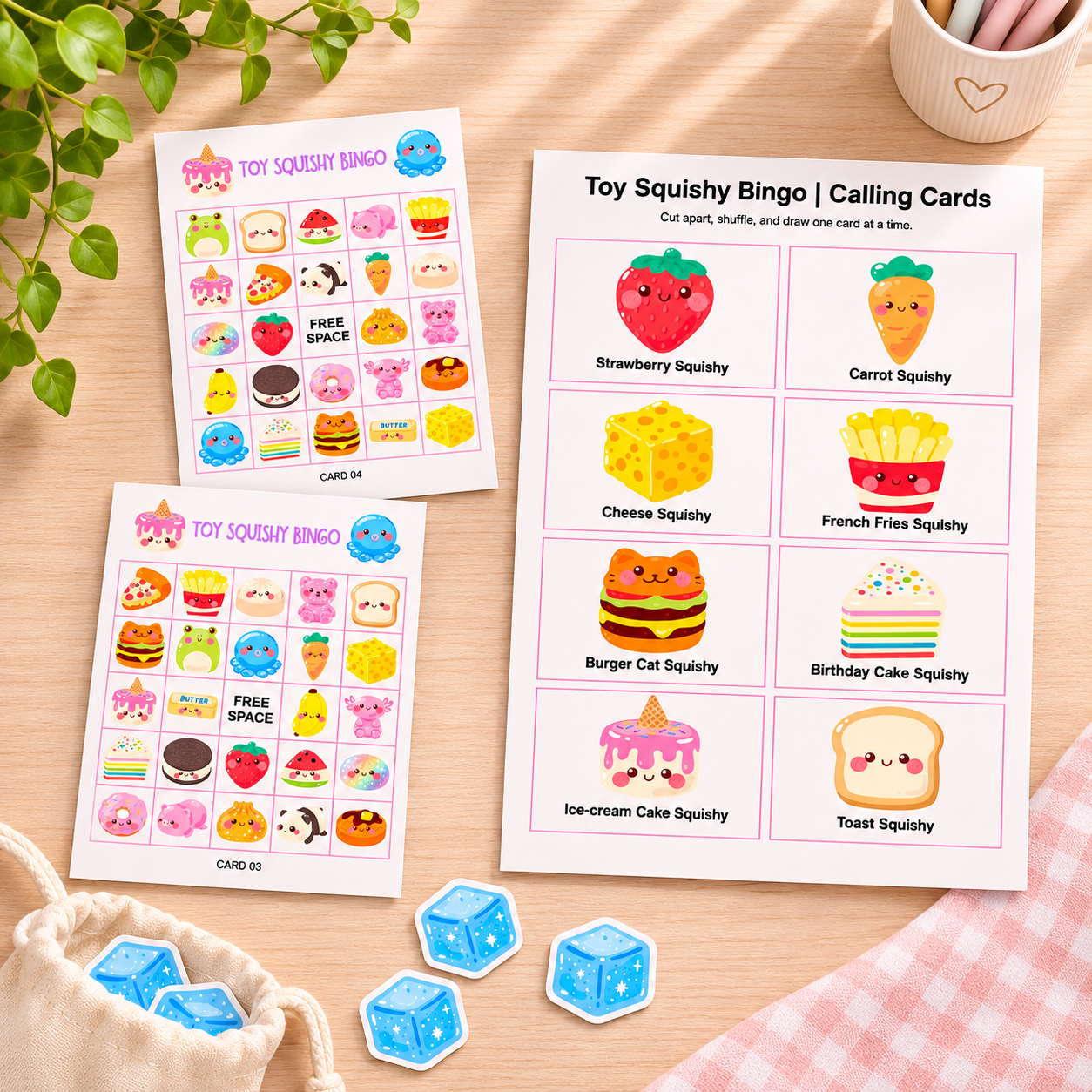
For my tutorial, I generated 10 individual bingo cards using the Squishy Toy artwork.
Because I'd selected two cards per sheet, the finished PDF contained five A4 pages with two bingo cards on each.
You can preview the cards inside the tool before downloading them.
Step 6: Create Matching Calling Cards and Printable Markers
Of course, a bingo game needs more than just the bingo cards themselves.
Your customer also needs a way to call out the images during the game.
Thankfully, Bingo Builder creates the matching calling cards using the artwork and labels you've already uploaded.
For my Squishy Toy Bingo game, the tool generated 24 calling cards across three printable pages.
Each calling card includes the matching illustration and its label, making it easy for someone to run the game.
Don't Forget the Bingo Markers!
You can also create printable markers inside Bingo Builder.
You have two options.
You can generate simple coloured circle markers, or you can upload your own artwork to use as markers.
For my squishy game, I chose an additional squishy illustration from the clipart collection.
It was a fun little detail that made the whole set feel more coordinated.
Once everything is ready, you can download your bingo cards, calling cards and markers as PDF files.
And just like that, you've created a complete printable bingo game!
Step 7: Package Your Printable Bingo Game to Sell on Etsy
Now that we've created our printable files, we need to think about how we're going to deliver them to customers.
Personally, I like to keep things simple and organised.
For a printable bingo game, I would consider including:
The bingo cards in PDF format
Matching calling cards
Printable bingo markers
A simple instructions page
A4 and US Letter versions, if you're offering both
A short "Read Me First" PDF explaining how to access and print the files
You could organise everything inside a clearly labelled folder and provide customers with access through a download link, or upload the files directly to Etsy if they meet the platform's file requirements.
The goal is to make the experience as easy as possible for your customer.
They should be able to download their files, print the game and start playing without feeling confused about what to do next.
Creating Your Etsy Listing Images
Because printable bingo games are such visual products, I would really let the artwork shine in your listing images.
For example, you could create a beautiful mockup showing three or four bingo cards fanned out on a table with the matching markers beside them.
I'd also include a graphic that clearly explains what's included in the download, such as the number of cards, calling cards, markers and available paper sizes.
And don't forget to show a close-up of the illustrations!
Customers want to see what they're purchasing, so make sure your images accurately represent the finished product and follow Etsy's current listing image requirements.
Watch the Full Bingo Builder Tutorial
Want to see the entire process in action?
I've created a step-by-step YouTube tutorial where I show you exactly how I made my Squishy Toy Bingo game using Bingo Builder.
You'll see how I prepare the clipart, customise the bingo cards, generate the calling cards and markers, and download everything as printable PDF files.
More Printable Bingo Game Ideas for Your Etsy Shop
Now that you know how to create a printable bingo game, the possibilities really start opening up.
You could create a whole collection of seasonal bingo games, such as Christmas, Easter, Halloween and Valentine's Day.
Or perhaps you'd prefer to focus on children's birthday parties and create themed games for dinosaurs, fairies, farm animals or space adventures.
You could even create educational bingo games for classrooms or family activities.
And here's another idea.
If you've already created a lovely collection of illustrations for your bingo game, why not explore other printable products using that same artwork?
For example, you could create a matching memory game, an I Spy printable or a scavenger hunt.
That way, one collection of artwork could inspire several different products that complement one another.
Of course, you'll still want to research each product idea and make sure you have the appropriate commercial rights to use the artwork.
But I think this is such a lovely way to approach building a creative business.
You don't always need a completely new idea.
Sometimes you just need to explore the possibilities of something you've already created!
Ready to Create Your Own Printable Bingo Games?
I hope this tutorial has shown you that creating printable bingo games doesn't need to be a complicated or time-consuming process.
You can still enjoy all the lovely creative parts, like choosing your theme, illustrating or sourcing artwork, and designing a product that feels unique to your shop.
And then you can let a tool like Bingo Builder take care of the repetitive work.
That's really how I love using tools in my own business.
Not to replace the creative process, but to make more room for it!
If you'd like to create your own bingo games, you can check out my Bingo Builder below.
🎲 Explore Bingo Builder and Start Creating Your Own Printable Games
And if you're looking for more digital product ideas, creative tutorials and a little encouragement along the way, I'd love to welcome you into my free community, The Digital Creator's Collective.
Happy creating, my friend!
Alicia xx
